
Danfoss’ universal programmable controllers serve as the smart, compact, and powerful brain of HVAC units. Equipped with the latest technology, they enable best-in-class application management, support low-GWP natural refrigerants, and feature a high-tech modular design.
Alsmart® Updates
How to update Alsmart® AS-CX06 firmware with Alsmart® Service Tool? (watch video)
One option to update your Alsmart® controller firmware is by using the Danfoss Alsmart® Service Tool software. Have a look at the video to learn how to use it.
How to update Alsmart® AS-CX06 firmware with Python? (watch video)
One option to update your Alsmart® controller firmware is by using Python software. Have a look at the video to learn how to use it.

How to update Alsmart® AS-CX06 firmware with USB-C? (watch video)
One option to update your Alsmart® controller firmware is by using the USB-C port. Have a look at the video to learn how to use it.
Become an expert in programming Alsmart® controllers by joining a practical face-to-face training in Alsmart® Design. Join us at one of the upcoming sessions:
- Nordborg, Denmark – March 4–5 | August 25–26 | October 20–21
- Venice, Italy – May 5–6 | September 15–16
- Tallahassee, USA – April 14–15 | July 14–15 | October 27–28
- Osasco, São Paulo, Brazil – April 7–8 | July 7–8 | October 6–7 (conducted in Portuguese)
More info and sign up

Alsmart® Innovative modular design with intuitive toolchain
Alsmart® Hardware
Is the side connector included with the expansion module, or does it need to be purchased separately?
The side connector is included with each expansion module, so there is no need to purchase it separately. However, it is also available as a spare part with a defined part number.
How many extensions can be connected to the Alsmart® and the power supply AS-PS?
It depends. The model of the main controller (AS-CX06) will have direct influence on the maximum allowed number of extension modules. For more details, take a look at the “Connections” sector here in the data sheet for more information: https://assets.danfoss.com/documents/455390/AI488320847739en-000202.pdf
How to ensure the compatibility of my Alsmart® hardware, Alsmart® Design and the firmware?
Danfoss is constantly improving the features of the Alsmart® controllers.
Therefore, firmware, hardware and software updates are released from time to time.
The table below displays the compatibility map for the Alsmart® Design as of February 2026.
| Compatibility table | |||
|---|---|---|---|
| Alsmart® controller | SW Application | ||
| FirmWare | HardWare | Alsmart® Design | Target |
| 1.05.x | PV03 | 1.04.x | 1.0 |
| 1.20.x | PV03, PV04 | 1.06.x | 1.01 |
| 1.32.x, 1.34.x | PV04 | 1.08.x | 1.02 |
| 1.40.x | PV04 | 1.08.x 1.10.x |
1.02 1.03 |
How can I assemble a 6-way connection cable myself to connect Alsmart® to a display?
You can assemble a 6-way connection cable by following our step-by-step guide. Click the here for the full instructions
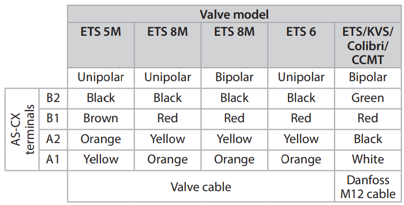
How to connect Danfoss stepper valves to Alsmart®?
Danfoss valve connections must follow the table found on Installation Guide.
Which temperature sensors are compatible with Alsmart®
Standard ones as Pt1000, PTC100, NTC10k and NTC5k. Custom sensors can be also created according to application needs.
Can multiple protocols be used at same on Ethernet ports?
Yes, since they use different ports
What is the max current of DO/AO for PWM signal?
For AO it is 15mA; for SSR it is 0.5A
Is there galvanic isolation between DI and DO outputs?
Yes
What is the main power supply for the controller? The AK-PS from AK2 product line?
There is no specific Power Supply for the Alsmart AS-CX06 main board. A regular transformer can be used (check the datasheet for further informations related to load requirements). The AK-PS power supply can also be used.
About the SSR relays - are they for AC/DC or only AC? Is there any restriction of voltage?
Output 100VDC/240VAC
What is the maximum distance between the Alsmart® controller and the Danfoss stepper valves?
30m. Check the requirements of the cable and impedance for each valve
Do the 3 lights in the Alsmart controller (red, yellow, green) come with any functionality enabled from factory, or is it necessary to assign a function to them using the software?
There are some specific patterns defined by BIOS to provide feedback before the application starts; e.g. to signal boot up, upgrade, errors, expansion running, expansion error. When the application starts it takes control of LED. We provide a library with default usage but it can be changed
When assembling the Alsmart with several expansions, an AS-PS is needed. Can we use the same power supply from the main controller to supply the AS-PS as well?
Yes, power supplies are isolated
If one of the extension modules is defective, is there any warning - such as the LED blinking, or some kind of alarm? This question reflects the AK2 extension modules - they have this feature in case of communication failure
Yes,
Expansion lost connection: green=ON, orange=OFF, red=ON
Can a single power supply be used for I/O expansion modules and power supply module AS-PS20?
Yes, since it meets the sum power of all expansion modules.
Remote expansion
The limitation we have is a few metres, less than 2m
Why did my internet stop working when I plugged the controller into my computer's USB port?
Your computer is prioritizing the new, wired USB network connection and disabling your Wi-Fi or Ethernet. This is a common security feature on corporate laptops and is controlled by your computer's settings, not the controller.
To fix this, you may need to contact your IT department to allow multiple active network connections. This issue does not typically occur on personal computers.
What does "Rndis CdcEcm Cdc" mean on the controller's screen?
RNDIS, CDC-ECM, CDC, and MTP are technical abbreviations for USB connection types. The controller's screen combines them to label each available mode. If you connect through the Service Tool instead, the same choices appear with clearer labels:
| Controller screen | Service Tool | What it does |
| Rndis CdcEcm Cdc (default) | Network over USB + Alsmart Design connection | Access the Service Tool and connect Alsmart Design |
| Rndis CdcEcm Mtp | Network over USB + File transfer | Access the Service Tool and browse files |
| Mtp Cdc | File transfer + Alsmart Design connection | Browse files and connect Alsmart Design, no Service Tool access |
| Cdc | Alsmart Design connection | Connect Alsmart Design only |
Can I access the controller's files just by plugging it into my computer?
Yes, as long as the USB mode includes File transfer. You can enable it from the Service Tool, under Settings → USB, or from the controller's local USB menu. Once enabled, the controller shows up like a device with a folder on your computer, so you can browse and copy files.
Alsmart® Design Software
Where to find the Alsmart® Design & other tools via Partner Portal?
The Alsmart® Design is only intended to be used for approved customers, this is to ensure the best-in-class support from the local Danfoss Office.
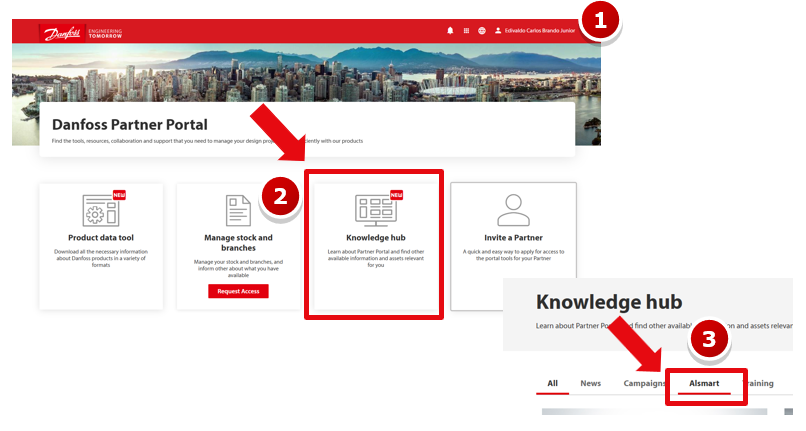
You can find the Alsmart® Design, libraries, templates, videos & other tools under the Partner Portal. An approval request will be sent to Danfoss. Steps to be followed in case you would like to sign up for the Partner Portal:
- Access https://partner.danfoss.com/
- Go to the Knowledge Hub
- Alsmart Tab & request the access for the first time
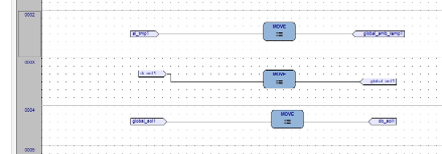
Is the Alsmart® Design based on execution order? Does the order of the networks affect the performance of the algorithm?
Do we have the LogLibrary for Alsmart® Design?
Yes
How to create a logic to show or not a screen according to a parameter or condition in Alsmart® Design?
In case you want a page associated with a parameter to appear/ disappear, you need to use VK_Fxx.
Therefore the virtual button, which opens the page, will be set only if the desired condition is true.

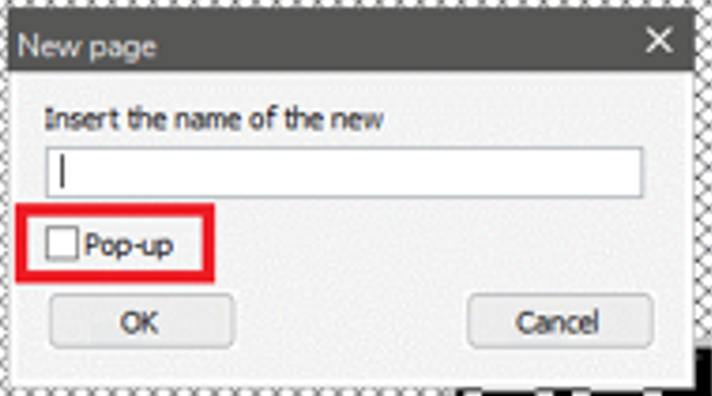
When a new screen is created, what is the pop-up option in the Alsmart® Design?
It is a pop window that you get on top of the current, generally with some quick information. It´s also known as "splash screeen". It typically does not occupy the full screen and you can get back to the previous.
Do the MQTTS have authentication by TLS?
Yes
WEB server: can it be customized?
To date, the web server is inside the aspkg package, so not customizable.
How to manage software that covers several machines and therefore different IOs?
The API allows a library to be developed that enables this
Alsmart® Community FAQ
How to Join the Alsmart Community?
I cannot complete the Alsmart® Community registration because of a message about my email and Microsoft. What should I do?
The Alsmart® Community runs on Microsoft SharePoint. The email used during registration must therefore be associated with a Microsoft account (e.g., Outlook, Hotmail, or a work/school Microsoft 365 account).
When filling in your email, you may see a message like this:

Non-Microsoft emails can also be used, but they must first be linked to a Microsoft account. This step is guided during registration.
During the process, you will see a “Confirm Email Type” pop-up:

This is an important step:
• If you are sure your email is Microsoft-associated, select Yes
• If you are unsure, select No / I don’t know and follow the instructions
After confirming, you may see a confirmation message:

If you cannot access the community after registration, contact the Alsmart® Community support team and include your registered email and a screenshot of the issue.
I registered with the wrong email address. Can I still access the Alsmart® Community?
The email used during registration is directly linked to your Alsmart® Community access and SharePoint permissions.
If you used the wrong email, you may have seen something like this during registration:

Or this confirmation step:

Using a different email during login, or registering with an email that is not Microsoft-associated, may prevent access.
To avoid issues:
- Use the same email that was approved for access
- Ensure the email is associated with a Microsoft account
- Do not switch to a different email when logging in
If you registered with the wrong email, contact the Alsmart® Community support team and provide both the incorrect and correct email addresses.
I cannot complete the EULA authorization step. I see an admin approval message. What should I do?
This issue is usually caused by your organization’s Microsoft security settings blocking the authorization process.
You may see an admin approval message like this:

On the authorization screen:

To continue:
1. Select “Can’t authorize”

2. Enter your email manually
3. Continue using the same email used during registration
If the issue persists, contact the Alsmart® Community support team.
I cannot log in to the Alsmart® Community. I see an MFA or 2FA error (Error Code 500121). What should I do?
This issue occurs when your Multi-Factor Authentication (MFA) setup is out of sync with the Microsoft Authenticator app.
You may see an error like this:

Or be asked to enter a code:

Important:
The Danfoss MFA used for the Alsmart® Community is separate from your personal or company Microsoft MFA.
To resolve this:
- Contact the Alsmart® Community support team and request an MFA reset
- After the reset, log in again
- You will be prompted to set up authentication:

4. Follow the instructions in Microsoft Authenticator
After completing setup, you will be able to access the community normally.
I see a message saying “An admin from Danfoss must update their access settings to accept inbound multifactor authentication.” What should I do?
This message indicates that your Danfoss MFA setup is incomplete or needs to be reset.
You may see a page like this:

This is related to the Danfoss authentication setup, not your personal Microsoft account.
To resolve this:
- Contact the Alsmart® Community support team
- Include a screenshot of the error
After the reset:
1. Log in again
2. You will be asked to complete authentication:

3. Follow the instructions
I can access the Alsmart® Community, but I get “Access Denied” when opening Alsmart Downloads. What should I do?
Access to Alsmart Downloads is managed separately from general community access.
You may see the Downloads section like this:

But when clicking it, you get:

This means your account does not yet have the required permissions.
To resolve this, contact the Alsmart® Community support team and include:
- Your registered email address
- A screenshot of the error
- Confirmation that you can access the main page but not Downloads
Once your access is updated, the section will work normally.
I can log in to the Alsmart® Community, but some content is restricted. What should I do?
If you can log in but cannot open specific sections (e.g., videos or technical resources), your account may not have the required permissions.
For example, you may see:

Or an error message like:

To resolve this, contact the Alsmart® Community support team and include:
- Your registered email
- The section you are trying to access
- A screenshot of the issue
The support team will review and update your permissions.
Where can I find the Alsmart Design toolchain and training videos?
The Alsmart Design toolchain and training materials are available in the Alsmart® Community portal.
First, go to the main menu:

Then open the downloads section:

Here you can find the toolchain, libraries, and firmware.
For training materials, go to:

Then open the videos page:

If you are new, start with Introduction Videos (1/2).
If you cannot access these sections, your permissions may need to be updated.
Who should I contact for questions or technical issues related to the Alsmart® Community?
If you experience issues with registration, login, permissions, or technical access to the Alsmart® Community, please contact the Alsmart® Product
Support team through alsmartcommunity@danfoss.com.
For faster support, include:
- Your registered email address
- A screenshot of the issue
- A short description of the problem