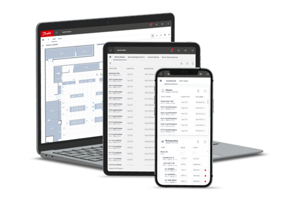
What is Storeview Web?
Storeview Web (SvW) is a software platform that offers a secure and modern user interface for full web access to the AK-SM800A and other selected legacy front-ends. StoreviewWeb will be replacing both Storeview Browser 5 and Storeview Desktop, while also replacing select features from tools like ServiceTool, RMT and SiteService. The application runs on multiple platforms including browsers, desktops and mobile devices. StoreviewWeb is built on modern frameworks is continuously updated with new features based on customer feedback independent from updates on the AK-SM 800A device firmware.
Storeview Web is built on the same software architecture as our Alsense® cloud services uses common elements ensuring the same look-n-feel across application. This makes it possible for Storeview Web to benefit from common features, and as a user you will experience a seamless user experience across the two platforms.
Why storeview web?
-
Available on multiple platforms
Storeview Web is the name of an application that will exist on multiple platforms, browser and desktop. Due to technical limitations as differences some functions/features will be limited to specific platforms. -
Secure and Continuously Updated
Always updated and using the newest available security updates of the underlaying components -
Domain knowledge
Created for food retail applications and integrating many years of refrigeration expertise. -
One tool going forward
Storeview Web combines multiple legacy tools (StoreView Desktop, StoreView browser, StoreView Browser 5, RMT, Site Service App) into one modern and consistent experience. -
Continuous development
Constant evolution of features & enhancements, based on customer feedback & usage analytics, independent from updates on the AK-SM 800A device firmware.
With the world’s population expected to reach 10 billion people by 2050, sustainable food retail and storage are more important than ever. Yet this is an often-overlooked step in the decarbonization of society.
Read full case story
Related products
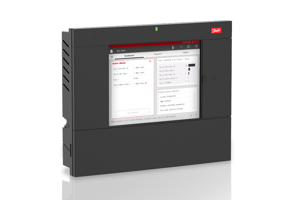
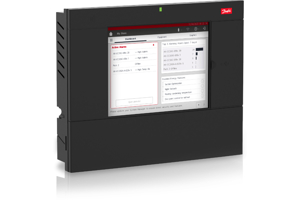
The system manager is the key component of the intelligent Danfoss ADAP-KOOL® refrigeration system for food retail.
Related applications

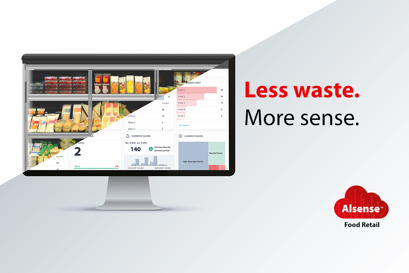
Sustainable portal for optimizing the performance of supermarkets and food retail applications.

The Smart Store solution enhances food safety and brings down the energy bill by integrated and smart control of refrigeration, HVAC, lighting and other applications.
Energy cost is one of the biggest expenses in the daily operation of your supermarkets. Therefore, retailers increasingly look to enhance the energy efficiency within the stores.
FAQ
How do I access to Storeview Web?
- Browser-based access
Go to svw.danfoss.com on your browser and login with your usual information, See below for common issues when connecting -
Desktop based access:
A desktop application will be available for download very soon, in the meantime you can save the app for offline use in your browser, see instructions below.
Do I need to sign up for Storeview Web?
No, you log in with the user profile you have created for your AK-SM 800A, along with the IP address of the unit. Note: It is only possible to access Storeview Web if you have access to a connected AK-SM 800A or AK-SM 800.
Which browsers are supported?
Most modern browsers are supported, e.g. Microsoft Edge, Google Chrome, Firefox and Safari. Internet Explorer is not supported as it has reached end-of-life.
We continuously update SvW and actively maintain support for the last 6 months of updates of the browsers.
Note: Edge and Chrome are both case on the Chromium browser engine, which from version 94 and above restricts how you can access private systems. See x) Common issues when connecting, if you experience problems.
Note: We also offer PWA versions of Storeview Web, see the x) How to save SvW for offline use
I cannot access HTTP version of Storeview Web
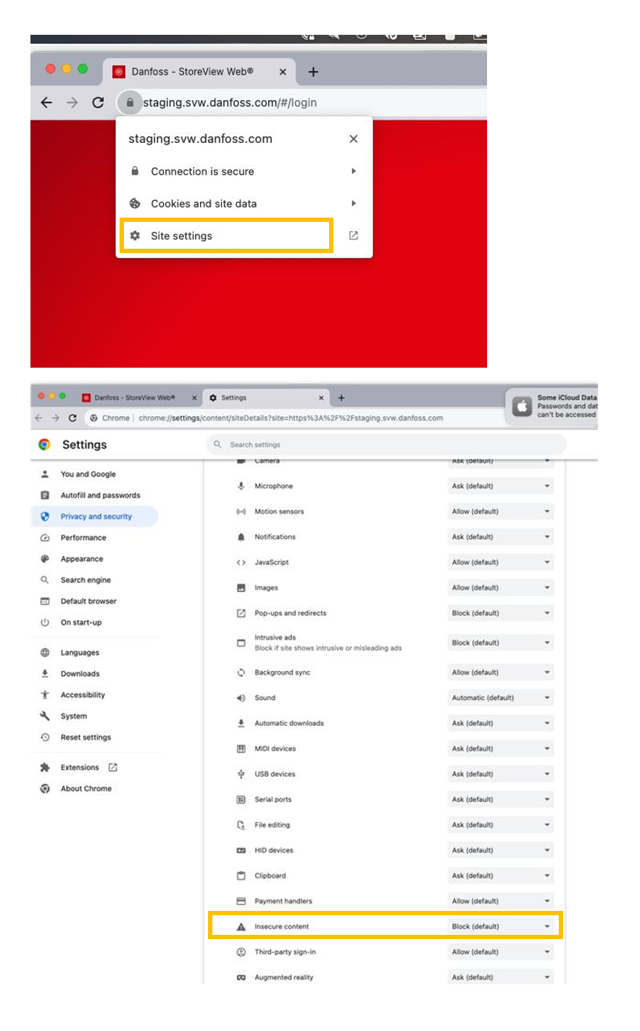
Many browsers are blocking access to HTTP sites, in Chrome you manually change the settings by following these step and “allow” for insecure content. As an alternative we recommend to use the Desktop version of Storeview Web.
Which operating systems are supported?
For now, SvW Desktop only supports Microsoft Windows version 7, 10 and 11. We are working on adding support for MacOS and certain Linux distributions in addition to docker support.
Note: We also offer PWA versions of Storeview Web, see the x) How to save SvW for offline use
Which hardware is supported?
AK-SM800 from version G08.045 and AK-SM800A all versions.
I get a warning and I cannot connect to my system?
See x) Common issues when connecting
Common issues when connecting
a. I have trouble connecting to my HTTPS enabled system-manager
You might see a warning when you try and connect to a HTTPS enabled system, mentioning that SvW could not reach the target system and that you might need to manually trust the certificate of the system. This warning can also be shown if the target system is offline or unavailable.
The AK-SM800A is loaded with a self-signed certificate from the factory, self-signed certificates are untrusted and as such requires manual validation by the end-user. The AK-SM800A user guide explains how to install a trusted certificate which allows you to skip this warning. Remember that if you are using a multi-system site, all certificates needs to be trusted. If that is the case, you will see a yellow warning triangle when logged in, which will prompt you to accept all certificates for all units in the system.
b. I have trouble connecting to my HTTP enabled system-manager
There are special considerations to be made when using a HTTP enabled system. HTTP connections are slowly being deprecated in favor of HTTPS which means that many browsers and operating system are slowly increasing the restrictions placed on those systems. This can impact SvW’s ability to communicate with the system-manager.
Most importantly a security mechanism called Cross-Origin Resource Sharing, or CORS, has recently been introduced to Chromium based browser from version 94 and above (See link for more details). CORS is a mechanism that’s intended to protect the end-user from malicious websites who would have been able to interact with private systems (I.e. your home router) using a cross-origin request. In other words, CORS prevents a public system, like svw.danfoss.com, from interacting with private systems like your system manager.
CORS takes effect when any public system, loaded over insecure HTTP, tries to interact with a system on a private network. Private networks are defined as any IP’s in the following subnets 10.0.0.0/8, 172.16.0.0/12 or 192.168.0.0/16.
This means that you will likely experience an inability to connect to an HTTP configured AK-SM800 system if your browser is either Edge or Chrome above version 94.
If you do experience problems, then we advise you to download and use the desktop version instead, or to use Firefox which is not yet affected, or to contact your Corporate IT department who can disable these security policies using a group policy.
c. I have other problems connecting to my system
Please reach out to your local representative and include details about your setup including; Browser Type and Version, IP settings of target system, Use of VPN if applicable, etc., please also include a system-report from the target system if possible.
d. Important differences between the different HW and FW versions:
- AK-SM800 FW G080.045 and above: This device does not support HTTPS and does not support CORS security
- AK-SM800A FW 3.0 and below: This device supports HTTPS but doe not support CORS security
- AK-SM800A FW 3.0 to 3.2: This device supports HTTPS and has support for CORS security
- AK-SM800A FW 3.2: This device supports HTTPS, Strict CORS and has support for header-based authentication
I am using a VPN or a proxy, Can I connect?
Yes you can, but it depends entirely on the configuration and type of VPN or Proxy. Most importantly, your device should be able to access the target device. You can check if you have access by going to the domain address or IP of the target device. If the browser does not timeout, but loads a page then you can connect using SvW. If the browser times out or if no page are shown, then you will likely not be able to use SvW.
How to save SvW for offline use
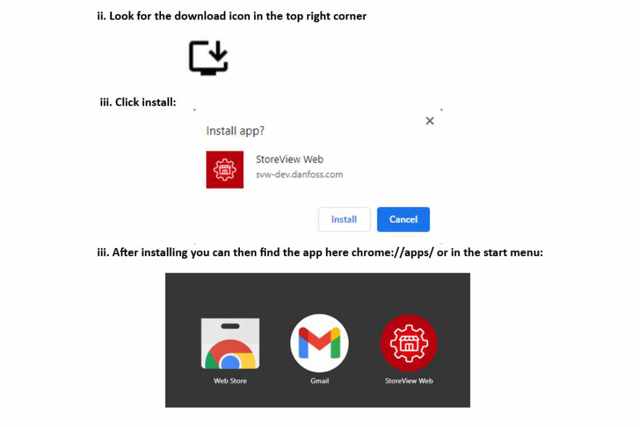
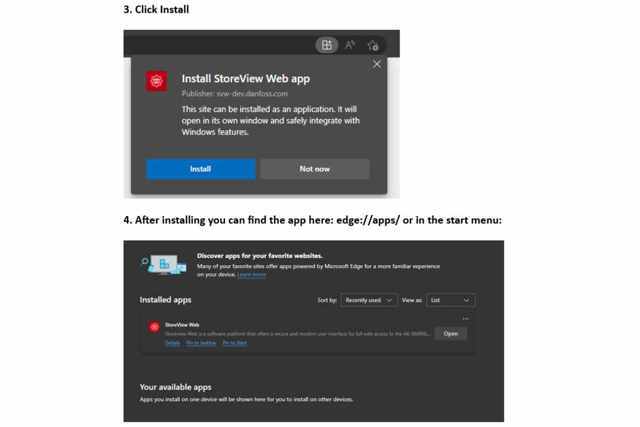
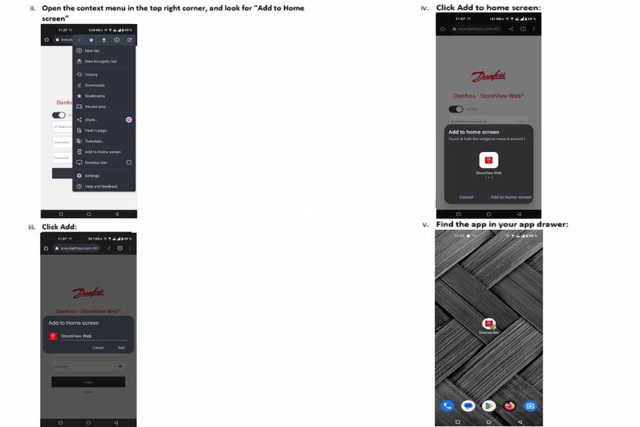
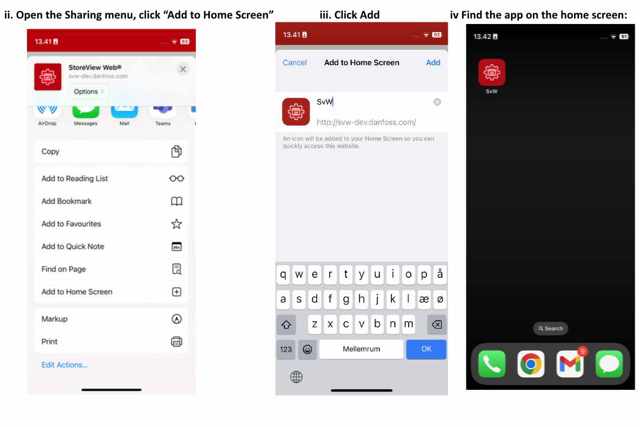
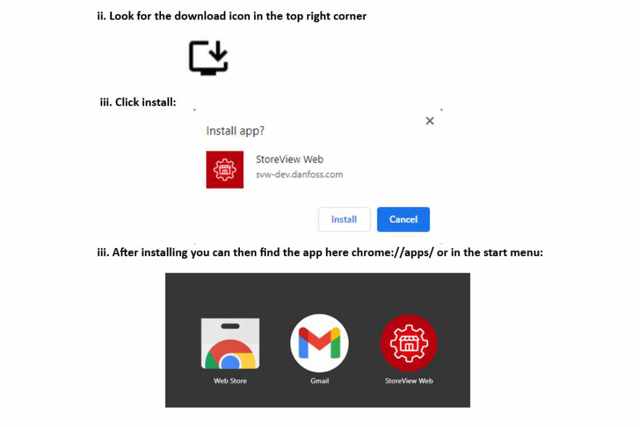
SvW can be installed as an offline PWA app on most devices. The feature is dependent on you OS and Browser type and version. If you don’t see the options mentioned below, then your device might not be supported.
Note: Installing a PWA application is only possible on the HTTPS version of SvW. Most browsers do not allow HTTP install. Once the application is installed, you can switch to HTTP mode within the application.
Install SvW on Chrome in Windows
- Go to https://svw.danfoss.com
Install SvW on Edge in Windows
-
- Go to https://svw.danfoss.com
- Look for the download icon in the top right corner
Install SvW on Chrome in Android
-
- Go to https://svw.danfoss.com
Install SvW on Safari on iOS
- Go to https://svw.danfoss.com
Install SvW on Chrome in macOS
- Go to https://svw.danfoss.com
SvW on Safari on macOS or Chrome/Edge on iOS
This is not supported by Apple