I guess the first question we should ask is, do you know what the VLT® Motion Control Tool MCT 10 itself is?
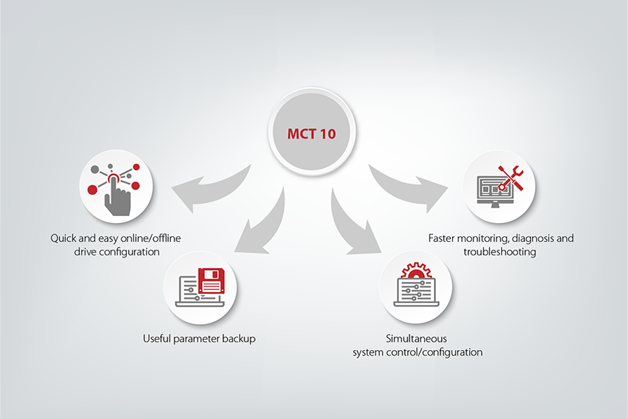
The simple answer would be, it’s an interactive tool for quick and easy online/offline configuration of a VLT® drive or soft starter using a PC. You can also use the tool to configure the communication network and to back up all your relevant parameter settings.
With MCT 10, you can control and configure your system simultaneously and monitor your entire system more effectively for faster monitoring, diagnosis, troubleshooting (alarms/warnings) and better preventive maintenance.
Levels of MCT 10
The next question would be, are you aware the tool comes in three different levels and do you know what each level offers?
The first two levels are Basic and Advanced.
- The Basic version allows you to create only four drives in the project, whereas the Advanced version allows 127 drives to be created in the project.
- Scoping is only available through two channels in the Basic version. This increases to eight channels in the Advanced version.
- Real-time logging is not available in the Basic version but is available through four channels in the Advanced version.
- The Functional safety configuration plugin, for graphically configuring the functional safety option is only supported in the Advanced version.
- The Advanced version also provides access to the Drive files system so that you can update the Drive and Option firmware.
More information on feature compatibility with specific drives and drive firmware can be found in the following video.
Newest features of VLT® Motion Control Tool MCT 10
OK, so you might already know these things about MCT 10. But did you know that version 4.00 of the tool has now been released, and that it includes even more features that enhance usability?
Amongst the many new features, the most important are the new Status plug-in and the new Motor plug-in.
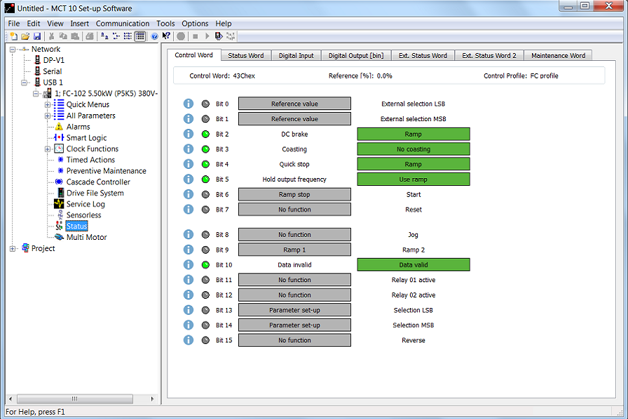
Status plug-in: we have greatly improved the user friendliness of the readouts for various status and control words, relay inputs and outputs that are available over the fieldbus. The original hex values (0x) have been ‘translated’ into a graphical representation. We have combined them into a single plug-in that shows you much more information. You’ll be able to see right away if a certain relay or bit is on or off, and what exact command the drive has been configured with. It’s a huge time saver as there’s no longer the need to find the manual and translate the hex value first.
Motor plug-in: this makes it easier to select the needed motor type and to parameterize the drive accordingly. Simply select the required motor type, and the corresponding parameters are shown. No parameters are missed, due to them being in different parameter groups, and they are listed together with a description guiding you on how to set the correct value. The plug-in displays the relevant parameters for motor commissioning depending on the motor construction (Parameter 1-10 in the drive):
- Asynchronous
- PM, non-salient SPM
- PM, salient IPM
- SynRM
We spoke before about MCT 10’s three different levels. Arguably the biggest addition to MCT 10 V4.00 is the third level – VLT® Software Customizer.
Customize your commissioning experience
As the name suggests, VLT® Software Customizer allows you to customize the commissioning experience of the VLT® to best fit your needs. It is a strong tool that enables you to quickly create your setup and test it first to MCT 10 using the simulator before uploading it to a real drive.
VLT® Software Customizer consists of three main features:
- SplashScreen allows you to create a custom splash screen for when the drive starts up. You can use the built-in editor to create an image from a blank or import an existing image from a library or from your computer and adapt it to the VLT®.
- InitialValues allows you to set a new default value for virtually any parameter.
- SmartStart allows you to create a custom start-up wizard to go through exactly the parameters you need.
How can I install MCT 10?
The Basic version of MCT 10 is easy to download:
- Open MCT 10
- Open the downloaded file
- Enter CD keycode 12314500 (do not enter a license key)
- Tick the box “Install basic version with limited functionality”
To install the Advanced or Software-customizer level, contact your local Danfoss Drives representative to receive your license.